本节介绍 reki 库的主要功能。
首先导入需要使用的一些库。
import datetime

import numpy as np
import pandas as pd
import xarray as xr
import eccodes
/home/wangdp/project/cedarkit/notebook-project/notebook-devel/repo/cedarkit-notebook-project/cedarkit-notebook/.venv/lib/python3.14/site-packages/gribapi/__init__.py:23: UserWarning: ecCodes 2.42.0 or higher is recommended. You are running version 2.34.1
warnings.warn(
import xarray as xr
import pandas as pd
from reki.data_finder import find_local_file
from reki.format.grib import load_field_from_file

# 数据环境配置:使用本地数据目录(可用环境变量 CEDARKIT_NOTEBOOK_DATA_ROOT 覆盖)
from cedarkit_notebook.data import get_data_root, get_dataset_query
DATA_CLASS = "cmadaas"
STORAGE_BASE = str(get_data_root())
start_time = pd.Timestamp.now('UTC').floor(freq="D") - pd.Timedelta(days=2)
start_time_label = start_time.strftime("%Y%m%d%H")
forecast_time_label = "24h"
forecast_time = pd.to_timedelta(forecast_time_label)
print("start_time:", start_time)
print("start_time_label:", start_time_label)
print("forecast_time:", forecast_time)
print("forecast_time_label:", forecast_time_label)
start_time: 2026-08-16 00:00:00+00:00
start_time_label: 2026081600
forecast_time: 1 days 00:00:00
forecast_time_label: 24h
system_name = "CMA-GFS"
data_type = "cma_gfs_gmf/grib2/orig"
# 起报时次与预报时效固定为本地已下载数据(见 data/metadata/cma-gfs.yaml)
query = get_dataset_query("cma-gfs")
start_time = pd.to_datetime(query["start_time"], format="%Y%m%d%H")
forecast_time = pd.to_timedelta(query["forecast_time"])
from reki.data_finder import find_local_file
gfs_grib2_file_path = find_local_file(
"cma_gfs_gmf/grib2/orig",
start_time=start_time,
forecast_time=forecast_time,
data_class=DATA_CLASS,
storage_base=STORAGE_BASE,
)
gfs_grib2_file_pathPosixPath('/home/wangdp/project/cedarkit/notebook-project/notebook-devel/repo/cedarkit-notebook-project/cedarkit-notebook/data/DATA/NAFP/NMC/GRAPES-GFS-GLB/2026/20260725/Z_NAFP_C_BABJ_20260725000000_P_NWPC-GRAPES-GFS-GLB-02400.grib2')file_path = find_local_file(
data_type,
start_time=start_time,
forecast_time=forecast_time,
data_class=DATA_CLASS,
storage_base=STORAGE_BASE
)
file_pathPosixPath('/home/wangdp/project/cedarkit/notebook-project/notebook-devel/repo/cedarkit-notebook-project/cedarkit-notebook/data/DATA/NAFP/NMC/GRAPES-GFS-GLB/2026/20260725/Z_NAFP_C_BABJ_20260725000000_P_NWPC-GRAPES-GFS-GLB-02400.grib2')geps_grib2_file_path = find_local_file(
"cma_geps/grib2/orig",
start_time=start_time_label,
forecast_time=forecast_time_label,
number=2,
data_class=DATA_CLASS,
storage_base=STORAGE_BASE
)
geps_grib2_file_pathreki 也内置了模式输出的一些中间文件。
下面示例获取 CMA-GFS 系统 240 时效的模式面二进制数据文件路径。
gfs_modelvar_file_path = find_local_file(
    "cma_gfs_gmf/bin/modelvar",
    start_time=start_time,
    forecast_time="240h",
)
gfs_modelvar_file_path
reki 内置的配置文件请查看 reki/data_finder/conf 目录。
读取 GRIB2 文件
基本方法
reki 使用 eccodes 从 GRIB2 文件中检索要素场,并返回 xarray.DataArray 对象。
下面示例从 CMA-GFS 的 GRIB2 产品文件中加载 850hPa 温度场。其中:
parameter参数表示要素名称,t代表温度level_type参数表示层次类型,pl代表等压面层,单位 hPalevel参数表示层次值
from reki.format.grib.eccodes import load_field_from_file

field = load_field_from_file(
    gfs_grib2_file_path,
    parameter="t",
    level_type="pl",
    level=850,
)
field
Loading...
可以使用 xarray 提供的一系列功能对要素场进行分析。比如使用 xarray.DataArray.plot() 函数实现快速绘图。
(field - 273.15).plot()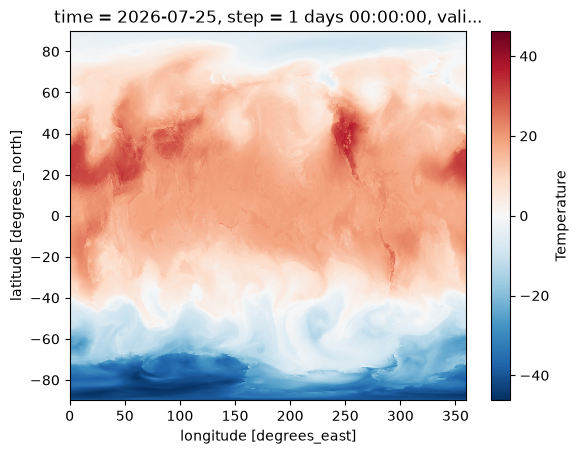
层次类型
reki 支持从模式面数据中加载要素场。
下面代码从 CMA-GFS 的模式面 GRIB2 数据中加载第 10 层 u 分量,其中 ml 表示模式面。
注:MODEVAR 的 GRIB2 仅保存在 CMA-HPC2023 超算平台中,下面代码暂不执行。
gfs_model_grib2_file_path = find_local_file(
    "cma_gfs_gmf/grib2/modelvar",
    start_time=start_time,
    forecast_time=forecast_time,
)
gfs_model_grib2_file_path
field = load_field_from_file(
gfs_model_grib2_file_path,
parameter="u",
level_type="ml",
level=10,
)
field更多筛选条件
load_field_from_file 函数的部分参数支持使用 ecCodes 的 GRIB Key 作为值,支持的参数包括:
parameter
level_type
level
同时也支持将 GRIB Key 直接作为参数传递。
下面代码通过字典形式的 parameter 参数加载 850hPa 雷达反射率场。
field = load_field_from_file(
    gfs_grib2_file_path,
    parameter={
        "discipline": 0,
        "parameterCategory": 16,
        "parameterNumber": 225,
    },
    level_type="pl",
    level=850
)
field
Loading...
from reki.format.grib.eccodes import load_message_from_file

message = load_message_from_file(
    gfs_grib2_file_path,
    parameter="gh",
    level_type="pl",
    level=850
)
message651024160读取经纬度格点数和数据值,将数据重组成二维数组。
values = eccodes.codes_get_double_array(message, "values")
ni = eccodes.codes_get_long(message, "Ni")
nj = eccodes.codes_get_long(message, "Nj")
values.reshape(nj, ni)
array([[1224.63710938, 1224.63710938, 1224.63710938, ..., 1224.63710938,
1224.63710938, 1224.63710938],
[1225.23710938, 1225.23710938, 1225.23710938, ..., 1225.23710938,
1225.23710938, 1225.23710938],
[1225.53710938, 1225.53710938, 1225.53710938, ..., 1225.53710938,
1225.53710938, 1225.53710938],
...,
[1246.53710938, 1246.43710938, 1246.23710938, ..., 1246.43710938,
1246.53710938, 1246.53710938],
[1243.83710938, 1243.83710938, 1243.83710938, ..., 1243.83710938,
1243.83710938, 1243.93710938],
[1243.03710938, 1243.03710938, 1243.13710938, ..., 1243.13710938,
1243.13710938, 1243.13710938]], shape=(1440, 2880))释放 GRIB 消息对象
eccodes.codes_release(message)